Shopify Script Tags Are Being Switched Off: The Two Dates and What Breaks
Apps stop being able to create script tags on 1 October 2026, and Shopify stops running them on 1 March 2027. What a script tag is, which parts of a store depend on one, and what replaces it.


Loading Article banner
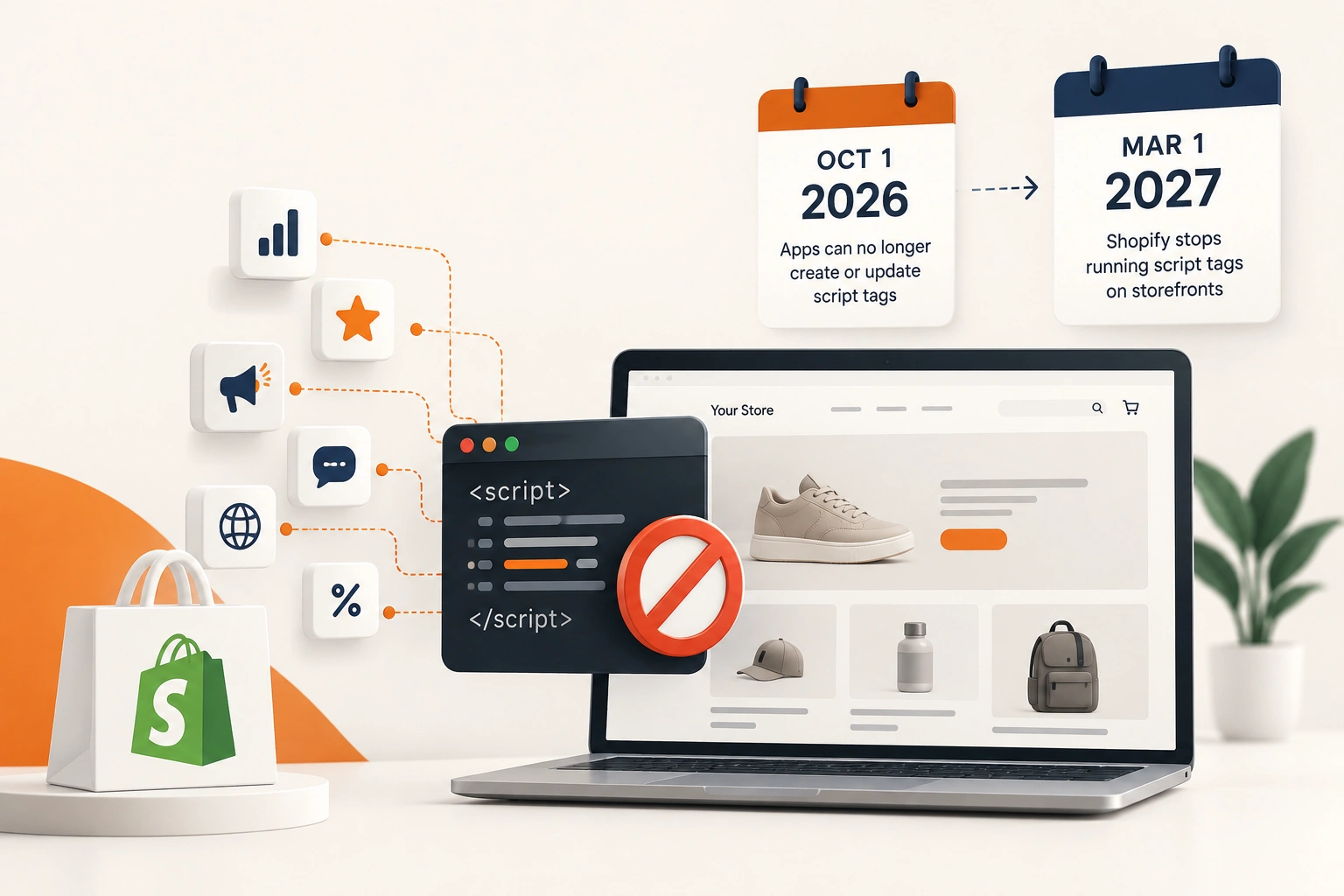
Shopify published the timetable on 24 August 2026, and it has two dates on it. From 1 October 2026 apps can no longer create or update script tags. From 1 March 2027 Shopify stops injecting them into storefronts at all.
The first date is eight days away at the time of writing and will pass without anything visibly happening. The second one is when things stop working. That gap is the whole problem: a store can look completely fine for five months and then lose tracking, a review widget, a currency switcher and a popup on the same morning.
What a script tag is, and where yours came from
A script tag is an old mechanism that lets an app inject a JavaScript file into your storefront without touching your theme. You install the app, the app registers a script tag through Shopify's API, and Shopify adds that script to every page.
Almost nobody creates one deliberately. They arrive with apps: analytics and pixel managers, review widgets, upsell and bundle apps, chat, cookie banners, currency and country selectors, wishlist tools, stock counters. A store that has been trading for a few years and has tried a dozen apps is usually carrying several, including some belonging to apps that were uninstalled without cleaning up.
They are also one of the reasons a Shopify storefront gets slow, because each one is a blocking request the theme did not ask for. Anyone who has been through what actually slows a Shopify store down has met them.
1 October 2026: apps stop being able to add them
Shopify's wording is precise. The scriptTagCreate and scriptTagUpdate mutations return a user error, and the ScriptTag REST Admin API resource rejects POST and PUT.
Nothing on your storefront changes that day. What changes is that an app can no longer install a new script tag or modify one it already placed. In practice this means a newly installed app that has not migrated will silently fail to do the thing you installed it for, and an existing app can no longer update its own script, which is how a script quietly goes stale.
This is the date to audit on, not the date to panic on.
1 March 2027: they stop running
On 1 March 2027 Shopify stops injecting script tags into storefronts. Anything that was still relying on one stops appearing.
The storefront is the surface involved. Checkout has had its own extension model for some time, so this is about the theme pages: product, collection, cart, search, home.
The failure mode is worth picturing. Nothing errors, nothing 404s, no banner appears in the admin. The widget is simply not there, the pixel is simply not firing, and the first sign is usually a reporting number that looks wrong a week later. If your conversion tracking is attached to a script tag, you lose the data before you notice you lost the script.
Pinning an old API version does not help
Shopify states that the deprecation applies to all API versions, including older ones, so pinning will not defer it.
That closes the usual escape route. A developer who has pinned an app to an older API version to avoid a breaking change is on the same timetable as everybody else, and so is any internal or agency built app doing the same.
What replaces a script tag
Two things, depending on what the script was for. For anything that renders or behaves on the storefront, the replacement is an app embed block shipped in a theme app extension, which a merchant activates in the theme editor. For anything whose only job is analytics, the replacement is a web pixel, which Shopify notes needs no action from the app user.
The distinction matters when you are chasing an app developer for an answer. A review widget needs an app embed block and a merchant has to switch it on. A tracking pixel should move to a web pixel and appear without you doing anything. An app that tells you it has migrated but leaves a widget missing has probably done the pixel and not the block.
Web pixels also interact with how sessions and traffic are attributed, which is a good moment to be sure you can tell real sessions from bot traffic in your analytics before you change the plumbing under it.
How to find what your store is running
Start with the app list, not the code. Go through every installed app and ask the developer, or read their changelog, for one thing: has this app moved to a theme app extension or a web pixel, and does the merchant have to activate anything.
Then check the theme editor. App embeds appear in the theme customiser under App embeds, and an app that has migrated but whose embed is switched off is the commonest version of this going wrong.
Then look at the storefront itself. View source on a product page and look at what is loading from outside your theme. Anything you cannot account for belongs to an app, possibly one you removed. Uninstalling an app does not always remove its script tag, and a script belonging to an app you no longer have is the easiest thing on this list to delete.
Do it before the quiet season ends
The timing is awkward and it is worth naming. The audit wants doing now, and the migration wants doing in January, because nobody should be changing the tracking on a storefront during peak. If you are in the middle of preparing a store for BFCM, do the audit and schedule the work.
One exception: if an app you depend on has already told you it will not migrate, replace it before peak rather than after. Discovering in February that the replacement changes your page structure or your URLs is a worse February than doing it now.
Where this goes next
The direction of travel on Shopify is consistent: every mechanism that let code get onto a storefront sideways is being replaced with one the merchant can see and switch off. Checkout went first, and the storefront is going the same way. It is better architecture and it makes stores faster, and it does mean a store that accumulated apps for five years has a bill to pay.
Working out which of your apps still matter, which have migrated and which should simply be removed is an afternoon of unglamorous work with a deadline attached, and it is the kind of thing Shopify store management is for. The stores that do it in January will not notice 1 March 2027 at all.
Frequently asked questions
The questions that come up most often on this subject.
Nothing visible. From that date apps can no longer create or update script tags: the scriptTagCreate and scriptTagUpdate mutations return a user error and the REST ScriptTag resource rejects POST and PUT. Existing script tags keep running until 1 March 2027.
Shopify stops injecting script tags into storefronts, so anything still delivered that way stops appearing. Typically that means analytics and pixels, review widgets, popups, cookie banners, currency selectors and upsell tools. Nothing errors and nothing warns you, which is why the usual first sign is a reporting number that looks wrong.
No. Shopify states that the deprecation applies to all API versions, including older ones, so pinning will not defer it. An app pinned to an old version is on the same timetable as everything else.
An app embed block shipped in a theme app extension for anything that renders or behaves on the storefront, which the merchant activates in the theme editor. A web pixel for anything whose only job is analytics, which Shopify notes needs no action from the app user.
Ask each app developer or read their changelog for whether they have moved to a theme app extension or a web pixel and whether you have to activate anything. Then check App embeds in the theme customiser, since a migrated app with its embed switched off is the commonest failure. Finally view source on a product page and account for everything loading from outside your theme, including leftovers from apps you have uninstalled.