Amazon Product Not Showing in Search: How to Test Indexing and What to Fix
It appears when you search the brand name and for nothing else. Indexed and ranked are two different things, and the first is a test that takes a minute. How to run it, the six reasons a listing is not indexed for a term, what fixes each, and the one thing never to do.


Loading Article banner
The thread on the Seller Forums this week is one every seller writes eventually: a new product, two weeks live, that shows up only when the search includes the brand name and for no general term at all. Support said system issue and went quiet. The seller asked whether to delete the listing and create it again, and the most useful reply on the forum said, in capitals, do not.
The reply was right, and so was the distinction it drew: indexed and ranked are different things. A listing that is indexed for a term appears somewhere in the results for it, page one or page forty. A listing that is not indexed for the term does not exist to that search. Ranking is what the listing, its sales and its advertising earn over months; indexing is a switch, and it is tested in a minute.
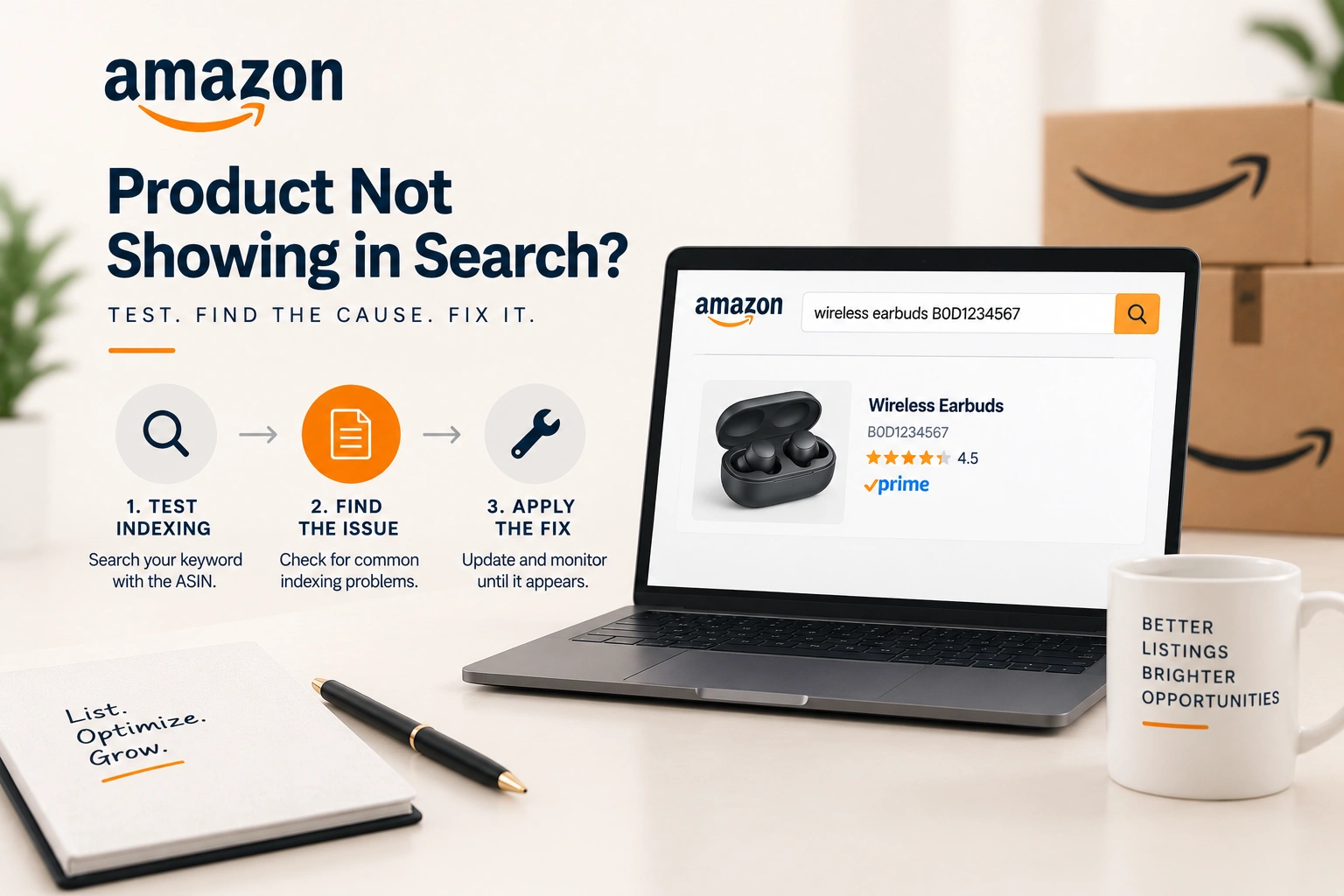
The indexing test
Search Amazon for the term with the product's ASIN after it, in the same box: the term, a space, the ASIN. If the listing appears, it is indexed for that term. If the results say no results, it is not. Run it for the five terms that matter most, and then for the brand name, which is how the seller in the thread found the pattern: indexed for the brand, indexed for nothing else.
Two cautions. The test says indexed or not; it says nothing about position, and a listing indexed for a term at page thirty is a ranking job, not an indexing one. And a term the listing was never given anywhere, not in the title, the bullets, the description, the attributes or the backend search terms, is not expected to index, and the fix for that is to add it, which the adding keywords article covers.
The six reasons a listing is not indexed
One, the listing is new. A new ASIN is indexed for its title terms within hours and for the rest over days, and a new ASIN with no sales history is not shown for competitive terms until it has some; sellers on the thread put the settling period at thirty to sixty days, which is their experience rather than Amazon's figure, and it matches ours. Two, the term is only in the backend search terms and the backend field is over its byte limit, in which case Amazon ignores all of it; the backend search terms article has the limit and the rules.
Three, the listing is suppressed or search suppressed, which is a status in the account rather than an indexing question: a missing image, an attribute out of category, a restricted word in the title. A suppressed listing appears for nothing, brand name included, so the brand test tells the two cases apart. Four, the term is a restricted or prohibited word, or a competitor's brand, which Amazon will not index a listing for whatever field it sits in. Five, the product sits in the wrong browse node, so a category filtered search cannot find it, and the fix is the category rather than the words. Six, the listing is a child of a variation family whose parent carries the search terms, and the child's own terms do not reach the parent's page; the variations article in this library covers how a family is searched.
What fixes each, and how long each takes
A new listing is fixed by time and by sales: advertising on the exact terms brings the first orders, and the first orders bring indexing for the terms the orders came from. Two to four weeks at a modest daily budget is the usual cost of teaching Amazon what a new product is for. An over limit backend field is fixed in a minute, and the terms index within a day. A suppressed listing is fixed by the attribute or image the account names, and returns within hours. A restricted word is removed. A wrong browse node is a category change request, which takes days. A variation family is fixed by putting the family's terms on the parent and each child's own terms on the child.
The check that decides which case it is takes ten minutes: the brand name test, the listing's status row in the account, the backend field's length, the browse node on the detail page, and the parent child structure in the catalogue. Support is the last step, not the first, and the Seller Support cases article is how to write the case when it comes to that.
The one thing never to do
Deleting the listing and creating it again resets everything the listing has earned: its sales history, its reviews if the ASIN changes, its two weeks of indexing progress, and its place in whatever queue Amazon's systems had it in. It also risks a duplicate listing violation if the catalogue still holds the old one. The seller who wrote the thread had a listing that was indexed for its brand, which means the listing was live, healthy and simply new; deleting it would have turned a thirty day wait into a sixty day one. When the listing is genuinely broken, it is fixed in place, through the attribute, the image or the category that broke it.
The order of work on a new product, for the brands we run under product listing optimisation, is the listing complete before launch, the indexing test on day two, exact match advertising from day one on the ten terms that matter, and the test repeated weekly until every term is indexed. Ranking follows, on the schedule that the listing optimisation article sets out, and it cannot start until indexing has finished.
Frequently asked questions
The questions that come up most often on this subject.
Search Amazon for the keyword followed by the product's ASIN in the same search box. If the listing appears it is indexed for that term; if there are no results it is not. Indexed is not ranked: an indexed listing can sit on any page.
Usually because it is new and has no sales history on its other terms, so Amazon has indexed the title's brand and little else yet. It can also be an over limit backend search terms field, a wrong browse node, or a child of a variation family whose terms sit on the parent.
Title terms within hours, the rest over days, and competitive terms once there are sales. Sellers commonly report thirty to sixty days for a new ASIN to settle, which matches our experience; exact match advertising on the terms shortens it.
No. Deleting resets the sales history, the indexing progress and possibly the reviews, and risks a duplicate listing violation. A listing that appears for its brand name is live and healthy; a listing that is suppressed is fixed in place through the attribute or image that suppressed it.
Indexing is whether a listing appears anywhere in the results for a term; it is a yes or no. Ranking is where it appears, which sales, conversion and advertising move over months. Fix indexing first, because ranking cannot begin on a term the listing is not indexed for.