Amazon Seller Assistant in Claude and Amazon Quick: What the Plugin Does, and What to Check First
Amazon's Selling Partner plugin puts Seller Assistant inside Amazon Quick and, in beta, Claude. What it can read, what it can change, the approvals Amazon describes, the free Quick Plus year, and the checks to make before connecting an account.


Loading Article banner
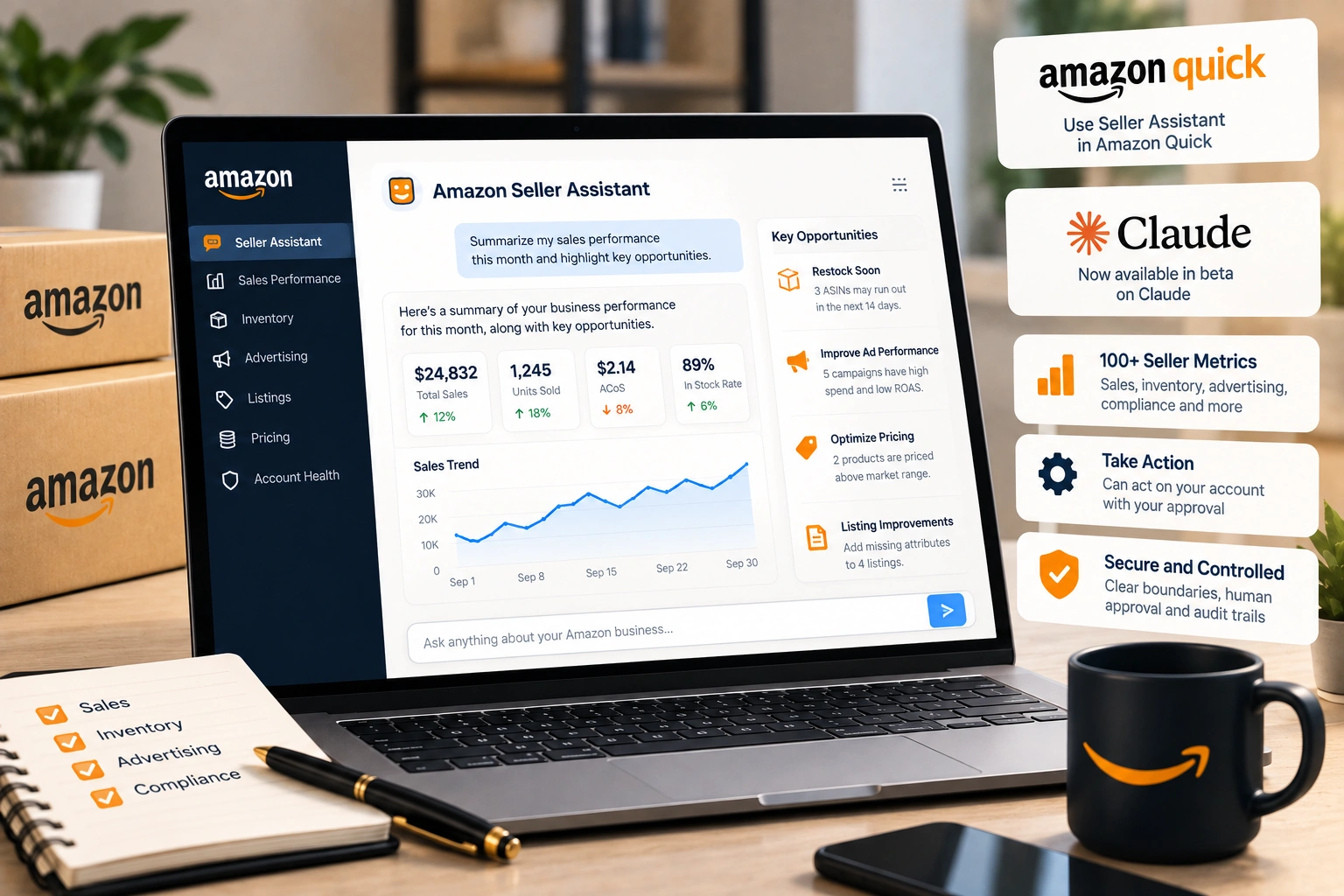
Until this week, Amazon's Seller Assistant lived inside Seller Central and nowhere else. A seller who wanted an answer from it had to be signed in, on the right page, asking in the chat box Amazon put there. On 23 September 2026, at its Accelerate conference, Amazon changed where the assistant can be reached and what it can do once it is there.
The short version is that a seller can now connect a selling account to Amazon Quick, and in beta to Claude, and ask questions of the business from inside those tools. The longer version matters more, because the same connection that reads the account can also act on it. This is what Amazon has said the plugin does, in Amazon's words, and the handful of decisions worth making before anybody on a team connects it.
What Amazon announced
Three changes to Seller Assistant itself, and one new way to reach it. The assistant now keeps what Amazon calls persistent memory: it "carries persistent memory of each seller's pricing patterns, inventory cycles, and growth goals", so a question asked on Tuesday does not start from nothing because Monday's conversation ended. It gains a visual workspace, which Amazon describes as a canvas where sellers can "model scenarios, compare pricing strategies, and diagnose campaign performance using live data." And it gains workflows: "custom automations that run continuously, monitoring conditions, interpreting changes, and responding dynamically."
Amazon's Selling Partners team describes the assistant as drawing on "over 100 seller metrics" across sales, inventory, advertising and compliance. That is the same set of numbers a seller already reads across a dozen reports; the change is that one conversation can pull them together. The new Seller Central put the assistant on the home screen earlier this year; this puts it wherever the seller already works.
The Selling Partner plugin, in plain terms
The plugin is the connection between a selling account and an outside AI tool. It launches with Amazon Quick, Amazon's own workplace assistant, and is "currently in beta" with Claude. For now it is for "sellers in Amazon's U.S. stores, with international expansion to follow." A seller selling in the UK or Europe only can read about it, but cannot connect it yet.
Once connected, the outside tool can reach "listing contributions, real-time performance metrics, inventory levels, and sales analytics." Amazon's own summary of what that means is the sentence worth reading twice: "Their AI doesn't just read from their Amazon business; it can act on it." Connecting to Claude takes, in Amazon's words, "roughly 60 seconds, no coding required."
That last point is why this deserves a decision rather than a click. A tool that takes a minute to connect and can change a live business is a tool somebody on the team will connect on a quiet afternoon because it looked useful. The question is not whether it is useful. It is who is allowed to let it act, and on what.
The controls Amazon describes
Amazon says that "every plugin interaction is protected by clear boundaries on what it can access, human approval on actions, and complete audit trails." Read as a seller, that is three things. The connection is scoped: it reaches the parts of the account Amazon has opened to it, not everything a person signed in could do. An action needs a person to approve it before it happens. And there is a record afterwards of what was asked and what was done.
Human approval is only as good as the human. An approval screen that says the assistant would like to lower a price by eight percent to win back the Buy Box is easy to accept at the end of a long day and hard to judge without the margin in front of you. The control Amazon built is real; whether it protects the business depends on who holds it.
The free Quick Plus year
Alongside the plugin, "every primary account holder globally can sign up for a free 12-month Amazon Quick Plus subscription, available through December 31, 2026," and the primary account holder can name two co-workers who receive a free year as well. Note who can claim it: the primary account holder, which for many brands is a founder who does not run the account day to day. If the people who will actually use it are the operations lead and the advertising manager, those are the two names to give.
What to check before connecting an account
Decide who connects it. One person, named, rather than whoever tries it first. The connection sits alongside the account's existing user permissions, and a tool connected by somebody who later leaves the business is a door somebody has to remember to close.
Decide what you would approve, before the first request arrives. Reading numbers, drafting a report, flagging a stock problem: approve freely. Changing a price, a budget or a listing: approve only when the person approving can see the reason and the number behind it. A price that holds margin and rank is worked out against costs the assistant may not know, such as a landed cost that changed this month.
Read the audit trail. Weekly, for the first month, by somebody other than the person approving. It is the only way to see what a connected tool has been doing in aggregate rather than one request at a time.
Remember it is a beta. Amazon has said so. A beta is a sensible thing to use for reading and asking, and a less sensible thing to hand the account's pricing to.
Where it helps, and where it does not
Where it helps is the work that used to mean opening six reports and a spreadsheet. Which ASINs lost sessions last week and whether the ads followed. Which products will run out before the next shipment lands. The reports worth reading have not changed; what changes is that one question can read several of them at once. Inventory questions in particular, where the answer depends on sales velocity, inbound stock and lead time together, are exactly what a tool with memory of a seller's cycles should be good at.
Where it does not help is judgement that depends on things outside the account. Whether a supplier's price rise is permanent. Whether a policy warning is worth appealing. Account health is the clearest case: an assistant can tell you a metric moved, and a person has to decide what to say to Amazon about it. The comparison sellers have been making for years, between running advertising in house, with an agency or with software, now has a fourth option on the list, and the same test applies to it: who is accountable when the number is wrong.
What we do with it
For the brands we run, a connected assistant is a faster way to read an account and draft the weekly picture, and it goes through the same review as everything else before anything changes on a listing, a price or a budget. The approval sits with the person who owns that part of the account, the audit trail is read by somebody else, and a change the assistant proposes is judged against the numbers it cannot see, which is where Amazon account management earns its place.
Frequently asked questions
The questions that come up most often on this subject.
It is Amazon's connection between a selling account and an outside AI tool, announced on 23 September 2026. It launched with Amazon Quick and is in beta with Claude. Once connected, the tool can reach listing contributions, real-time performance metrics, inventory levels and sales analytics, and Amazon says it can act on the business, not only read from it.
Not yet. Amazon says the plugin is for sellers in its US stores, with international expansion to follow. A seller selling only in other Amazon stores cannot connect it for now.
Amazon says every plugin interaction is protected by clear boundaries on what it can access, human approval on actions, and complete audit trails. An action needs a person to approve it. The practical protection is deciding in advance who approves and which kinds of change they approve, and reading the audit trail regularly.
Every primary account holder can sign up for a free 12 month Amazon Quick Plus subscription, available until 31 December 2026, and can name two co-workers to receive a free year as well. The primary account holder is often not the person who runs the account day to day, so the co-worker places are worth giving to the people who will use it.
No. Amazon says connecting takes roughly 60 seconds and needs no coding. That is also the reason to decide beforehand who on the team connects it, because it is quick enough for anybody to do on impulse.